How I turn a big project into one next step
Gather the context, separate sources from drafts, and choose an action you can finish. A practical process for working on a project with an AI assistant.
Updated 2 October 2026 · Materials v1.0
Video coming later
The episode will demonstrate a project in ChatGPT Work or Claude. For now, you can follow the complete written process below.
Get the guide materials
Editable Markdown files without a required subscription to another tool. Start with START-HERE, then fill in the brief for your own project.
- The One Next Step pack: five-category folder structure, project brief template, next-action template
- Three prompts to adapt
- What the assistant needs to do
Free · 8 editable files · RU / EN · Version 1.0. Enter your email: once the request is accepted, a download button appears and we email you the same link. Newsletter signup is separate.
Key takeaways
- Folders help when the nearest result is clear.
- The assistant works with selected materials and explicit boundaries.
- Each session ends with a checked result and one next action.
Start with the result, not the folders
“Work on my website” can mean dozens of tasks. First define the next result you could show another person. Then organise the materials needed to produce it.
Launch a personal website, a channel and product sales
Fill in the first episode brief: who it helps, which problem it addresses and which example it demonstrates
Done when all three points are written down and authorised source material has been selected for the example
Five categories instead of “Miscellaneous”
This is a suggested starting structure. Create only the folders you need. For a small project, a brief, source materials and working files may be enough.
00_Management/Why and what next
Project brief, decisions and one current next action
01_Sources/What we rely on
Your notes, requirements, links and authorised examples. Keep originals
02_Working/What we are making
Drafts, scripts, alternatives and review results
03_Ready/What passed review
Approved files and exports. Ready does not mean published
99_Archive/What is no longer current
Replaced versions and completed stages. Move only after checking
Use meaningful names: “First episode script v01”, then v02. Record publication status and the approved version in the brief. Avoid chains such as “final-final2”.
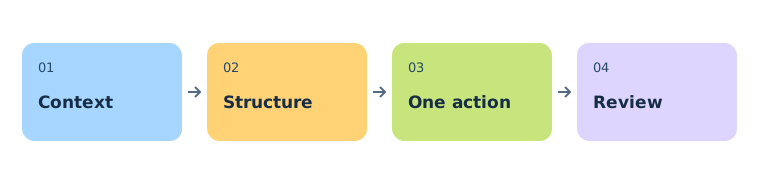
From a big project to one action
Define the nearest result
What should exist at the end of this stage? For example, a script with one reproducible example.
Give the assistant the right context
Provide the brief and specific sources. Identify the current files and what it may change.
Find what is blocking progress
Ask the assistant to separate confirmed decisions from assumptions and identify a missing input or decision.
Choose one executable action
Specify a verb, an object, inputs and a checkable result. If it depends on someone else, start by requesting that input or choose an independent task.
Check the result and leave a restart point
After the task, update the result, open questions and next action in one file. Start the next session there.
Fill in the first episode brief: who it helps, which problem it addresses and which example it demonstrates
Done when all three points are written down and authorised source material has been selected for the example
Replace the bracketed text with your task, result and available time. Provide only the materials for your chosen project.
Three prompts to adapt
Review the materials
Work only on project [name]. The nearest result is [result].

Read only the attached files or files explicitly available to you. List what you actually read and what is missing. Group materials into management, sources, working files, ready outputs and archive. For each proposed move, state the old path, new path and reason.

Do not move or delete anything yet. Do not call files duplicates just because their names are similar. Do not include other projects.
Choose the next step
Read the project brief and next-action file. The nearest result is [result]. Today I have [time].

Identify the main current blocker. Propose exactly one executable action: what to do, which inputs to use, which file or result to produce, and how to check completion. State any dependency. If it does not fit the available time, narrow it. Do not invent decisions or facts. If progress requires my answer, ask one specific question.
Close the session
Check the result against the definition of done. Distinguish what was created, checked, approved and published. Do not call an unchecked draft finished.

Prepare an update to the next-action file: completed work, current file, open questions, one next action and its definition of done. Save it only if you have access and permission; otherwise return the text for me to paste.
What the assistant needs to do
Three explicit instructions are enough for a first pass. A separate plugin is optional. The pack includes a plain text instruction file with these rules.
File organiser
Inventories files and proposes a structure first. Keeps originals and never declares duplicates based on names alone.
Next-action planner
Identifies the nearest result, checks dependencies and proposes one action with a definition of done.
Reviewer and handover writer
Checks the result against the task and updates a short record of where work stopped.
One approach, different access methods
In ChatGPT Work or Claude, use the brief and instructions as project context and provide relevant materials for each task. Access to local files depends on the mode and permissions. First ask the assistant to identify the files it can access. A folder on your computer does not become accessible automatically.
Try it on one project
Do not reorganise your entire workspace. Choose one project, fill in the brief and check whether you can continue tomorrow without reconstructing the context from chat history.
Get the guide materials